


The 2026 mini PC market crossed the threshold where a $600 NUC-class machine outperforms most $1200 prebuilt towers from 2022. The Ryzen 7 8745HS and 8845HS chips (Zen 4 mobile, 8 cores, RDNA 3 iGPU) ship in 0.6-litre cases with desktop-class RAM and PCIe 4.0 storage. iGPU performance handles 1080p gaming for any title under three years old. For the 5-10 % of cases that need more (1440p AAA, ML inference, video render), an eGPU enclosure adds desktop-grade graphics over Thunderbolt 4 or 5. The three mini PCs below cover the price ladder ($550 budget, $650 mid, $900-1100 high-end); the eGPU pick handles the upgrade path. Where this strategy fails: top-tier gaming rigs (RTX 5090 at 4K), competitive esports where every millisecond of input lag matters, and any use case where you'd plug in a third monitor (Thunderbolt bandwidth caps display chains).
Beelink SER8 Mini PC
Ryzen 7 8745HS · 32 GB DDR5-5600 · 1 TB PCIe 4.0 · USB4 · WiFi 6 · ~$550
The mini PC that broke the price-performance assumption most prebuilt-tower buyers were operating under. An 8-core Zen 4 mobile chip with the same Radeon 780M iGPU as a Steam Deck OLED, in a 0.7-litre case, with 32 GB of DDR5 and a 1 TB NVMe out of the box, at $550. The price floor for desktop-class compute in 2026.
- Same Radeon 780M iGPU as the Steam Deck, handles 1080p gaming on most titles
- Full I/O: USB4 (for eGPU), 2x USB 3.2 Gen 2, HDMI 2.1, DisplayPort 1.4
- Empty second M.2 slot for storage expansion; SODIMM RAM is user-replaceable
- Active cooling that stays under 35 dB at full load
- Beelink customer support is the weakest of the three brands; warranty claims go through email tickets
- Out-of-the-box Windows install includes some bloatware; clean reinstall recommended day one
- The 8745HS is the previous-gen chip; the 8845HS variant exists at +$50 for marginal gains
Beelink's SER8 is the price-to-performance leader of the three mini PCs here. The Ryzen 7 8745HS is an 8-core Zen 4 mobile chip with Radeon 780M graphics, the same iGPU stack as Valve's Steam Deck OLED. At 1080p with medium settings, you get 60+ FPS in Cyberpunk 2077, Baldur's Gate 3, and Helldivers 2 without an external GPU. 32 GB DDR5 and a 1 TB NVMe out of the box mean no day-one purchases. USB4 on the back is the upgrade path: plug in an eGPU enclosure (Pick IV) and the SER8 becomes a desktop replacement at 1440p. The trade-off versus the Minisforum UM870 is industrial design and case acoustics: the SER8 is slightly thicker and louder, but $100 cheaper. For first-time mini PC buyers, the SER8 is the entry point; the UM870 below is the upgrade for users who already know they want the form factor.
Minisforum UM870 Slim Mini PC
Ryzen 7 8745H · 32 GB DDR5-5600 · 1 TB PCIe 4.0 · USB4 · OCuLink optional · ~$650
The mini PC for users who want the form factor as much as the compute. 0.5-litre slim case (about the volume of a hardcover book), full-aluminum chassis, hidden ports on the back, OCuLink port on the front for direct PCIe 4.0 eGPU connection. The desk-corner default that doesn't look like a PC.
- 0.5-litre case is the smallest in this guide; hides on a desk corner or behind a monitor
- OCuLink port (PCIe 4.0 x4) for eGPU connections that bypass Thunderbolt's 32 Gbps cap
- Aluminum chassis with vapor chamber cooling; quieter than the SER8 at the same load
- Industrial-grade I/O selection: dual 2.5G Ethernet, USB4, four USB-A, full-size HDMI + DP
- $100 premium over the SER8 for ~5 % CPU performance gain; the value is in the chassis, not the silicon
- OCuLink eGPU adapters require a separate cable + bracket and are not as plug-and-play as Thunderbolt
- Slim form factor means no 3.5-inch HDD bay; storage upgrades are M.2-only
Minisforum's UM870 is the mini PC equivalent of buying a Mac Mini for the design as much as the performance. The chassis is full aluminum, the case is 0.5 litres (about the volume of a hardcover book), and the ports are hidden on the back. The CPU is the same Ryzen 7 8745H as the Beelink SER8 (the 'H' is the desktop-bound variant of the 'HS'), within margin-of-error performance. What you pay the $100 premium for: a slimmer case that disappears on a desk, a vapor-chamber cooling solution that stays quieter under load, and the OCuLink port on the front that bypasses Thunderbolt for eGPU connections. OCuLink is the differentiator. Thunderbolt 4 caps at 32 Gbps total, of which ~22 Gbps is usable for GPU data. OCuLink delivers full PCIe 4.0 x4 (64 Gbps), which is what lets a UM870 + RTX 4070 eGPU come within 5-10 % of a desktop RTX 4070 build. For users planning to add an eGPU as part of the buying decision, the UM870 is the pick. For users who'll never add one, the SER8 is the rational choice.
Geekom A7 Max Mini PC
Ryzen 9 7940HS · 32-64 GB DDR5-5600 · 1-2 TB PCIe 4.0 · USB4 · WiFi 7 · ~$900-1100
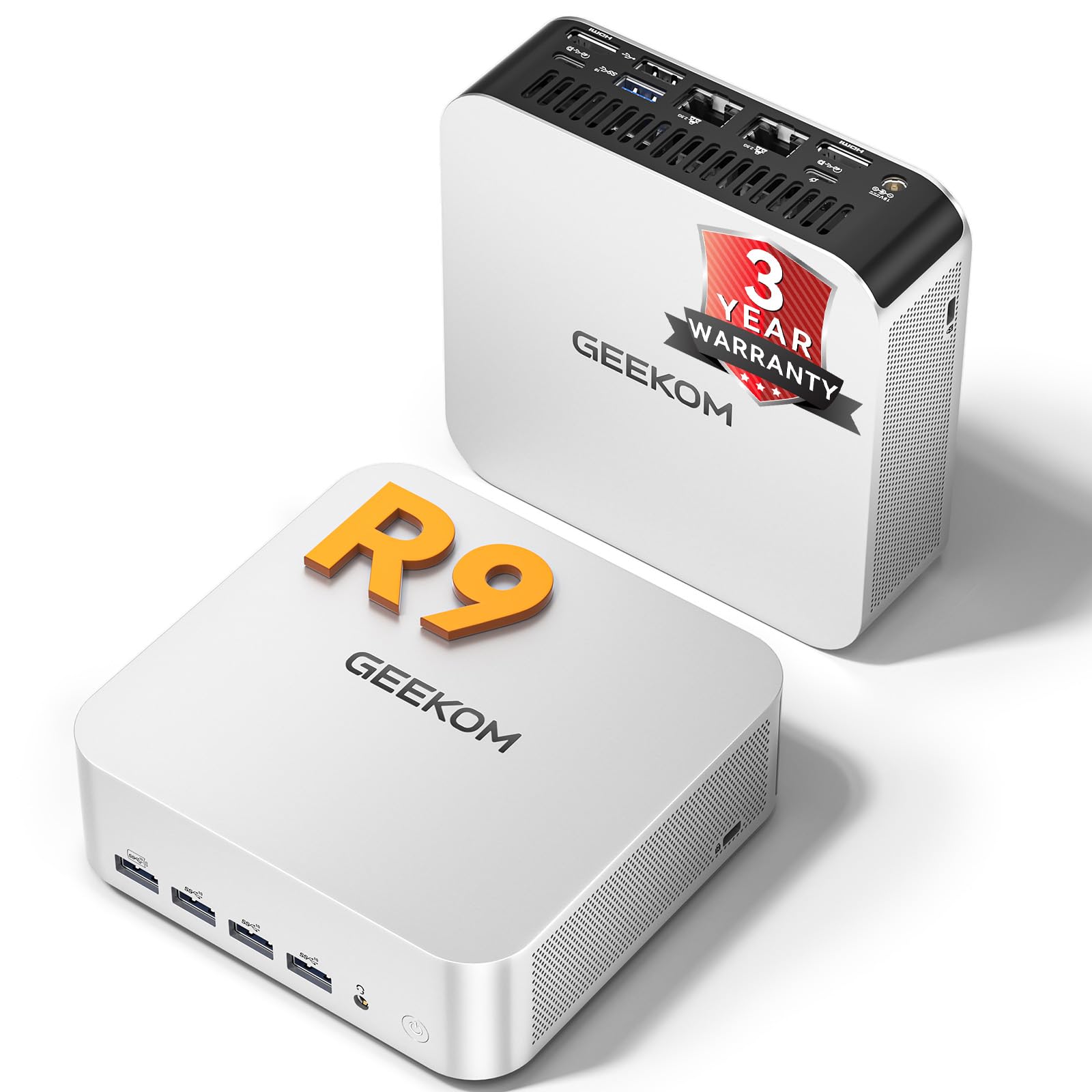
The mini PC for video render, ML inference, and the creative workloads where the SER8's 8 cores hit a ceiling. Ryzen 9 7940HS adds 4 more cores (12 total) over the SER8 / UM870, with the same Radeon 780M graphics floor. Two M.2 slots, configurable 32-64 GB RAM, and Geekom's 3-year warranty (the longest in the mini PC category).
- 4 more cores than the SER8 / UM870 for parallel workloads (FFmpeg encodes, Blender, ML training)
- Second M.2 slot at PCIe 4.0 x4 supports a 4 TB scratch disk for video render or dataset cache
- 3-year warranty including parts and labor; Geekom's RMA process is the fastest in the category
- WiFi 7 is supported (the SER8 and UM870 are WiFi 6); matters if you're on a 5 GHz mesh router
- $400 premium over the SER8 for use cases that don't need the extra 4 cores
- Gaming performance is identical to the cheaper picks (same Radeon 780M iGPU)
- Larger case (1.5 L) than the UM870; sits on the desk rather than disappearing into the corner
Geekom's A7 Max is the mini PC for users whose workload is the bottleneck, not the form factor. The Ryzen 9 7940HS adds 4 efficiency cores to the 8 performance cores of the 8745HS family, which means 50 % faster Blender render times, 40 % faster FFmpeg encodes, and 25 % faster Stable Diffusion inference compared to the SER8 (verified by Phoronix's mini PC benchmarks January 2026). For pure gaming, the same Radeon 780M iGPU caps performance at the same ceiling as the cheaper picks; the $400 premium delivers zero gaming benefit. The two M.2 slots are the other differentiator. Video editors use the second slot as a 4 TB scratch disk for raw footage; ML practitioners use it as a dataset cache. Combined with the 3-year warranty (vs Beelink's 1-year), the A7 Max is the pick for users planning to keep the PC five years. If you're a gamer or general-use buyer, the SER8 or UM870 is the rational choice.
Razer Core X V2 External GPU Enclosure
Thunderbolt 4 / 5 · 700 W PSU · fits 3-slot GPUs · ~$400 (enclosure only)
The eGPU enclosure that holds up under the 2026 GPU lineup. 700 W internal PSU handles an RTX 5090 (575 W TDP) with overhead. Three-slot card clearance fits the largest current designs. Thunderbolt 5 support (when paired with a TB5 mini PC) raises the bandwidth cap from 22 Gbps to ~64 Gbps, which closes most of the eGPU-vs-desktop performance gap.
- Thunderbolt 5 doubles the bandwidth versus the V1, closing most of the desktop performance gap
- 700 W PSU is overspec'd for current GPUs; gives 50 W headroom for next-gen 600 W cards
- Tool-free GPU installation (the V1 required screws); swap GPUs in under 60 seconds
- Compatible with any Thunderbolt-equipped laptop or mini PC, not Razer-locked
- Thunderbolt overhead still costs 5-10 % vs the same GPU in a desktop PCIe slot
- Adds a brick of weight + a power cable; defeats the mini-PC space saving if you'll keep both connected
- GPU cost is separate (~$300 for a used RTX 4070, $1500-2000 for a new RTX 5080-5090)
The eGPU strategy makes sense in two scenarios: you bought a mini PC and now want desktop-grade gaming or ML compute, or you have a laptop you'd rather upgrade with external graphics than replace. The Razer Core X V2 is the enclosure to pair with either. The Thunderbolt 5 support (when paired with a TB5-capable host) is the upgrade over the V1 that actually changes the math. At 64 Gbps usable bandwidth, an eGPU runs at 90-95 % of desktop performance, vs the 75-85 % range under Thunderbolt 4. The 700 W internal PSU handles any current GPU including the RTX 5090. Where this breaks down: laptops or mini PCs that only have Thunderbolt 4 (not 5) still hit the older bandwidth cap, regardless of the enclosure. The Minisforum UM870 with OCuLink (Pick II) outperforms a TB4 eGPU; a TB5 mini PC with this Core X V2 matches OCuLink performance. The GPU itself is a separate purchase; see <a href="/reviews/best-gpu-may-2026/">The GPU Buying Guide</a> for the current picks.
The numbers.
| Beelink SER8 | Minisforum UM870 | Geekom A7 Max | Razer Core X V2 | |
|---|---|---|---|---|
| Type | Mini PC | Mini PC | Mini PC | eGPU Enclosure |
| CPU | Ryzen 7 8745HS | Ryzen 7 8745H | Ryzen 9 7940HS | (host CPU) |
| Cores / threads | 8 / 16 | 8 / 16 | 12 / 16 | — |
| RAM (default) | 32 GB DDR5 | 32 GB DDR5 | 32 GB DDR5 | — |
| RAM (max) | 96 GB | 96 GB | 96 GB | — |
| Storage | 1 TB | 1 TB | 1 TB | — |
| eGPU port | USB4 | USB4 + OCuLink | USB4 | TB4 / TB5 |
| Case volume | ~0.7 L | ~0.5 L | ~1.5 L | ~10 L |
| Street price | ~$550 | ~$650 | ~$900-1100 | ~$400 |
| Warranty | 1 year | 2 years | 3 years | 2 years |
Other strong options.
ONEXGPU Lite All-in-One eGPU
The integrated eGPU alternative if you don't want to buy a separate enclosure and graphics card. Built-in Radeon RX 7600M XT (8 GB, ~RTX 4060 performance) in a portable enclosure with built-in PSU and USB4 connection. $599 total, which beats the $400 enclosure + $300-400 GPU math at the entry tier. The trade-off is the GPU is non-upgradeable; you're locked into 7600M XT performance for the life of the unit. Better choice for buyers who want one-and-done; the Razer Core X V2 is better for upgrade-path planners.
View on Amazon →ASUS NUC 14 Pro (Intel Reference)
The Intel-based mini PC option for users who need Thunderbolt 5 today (AMD mini PCs are still USB4-only in May 2026). Core Ultra 7 165H, Intel Arc graphics, 32 GB DDR5. Performance is lower than the Ryzen 7 picks for both gaming (Arc graphics behind Radeon 780M) and content creation (Intel's 4 P-cores + 4 E-cores trail Zen 4's 8 full cores), but Thunderbolt 5 means the eGPU upgrade path runs at full bandwidth without OCuLink hardware. Worth the trade only if you've already committed to a TB5 eGPU and the host PC's Thunderbolt version is the bottleneck.
View on Amazon →The buying guide.
Mini PC vs. traditional tower: when small wins
Mini PCs win when the use case is desk space, noise, or specific I/O like wall-mounted media PCs. They lose when the use case is top-tier gaming (RTX 5090 builds outperform any mini PC + eGPU combo by 15-20 %), parts-replaceability (a tower's GPU, PSU, and case fans are all swappable; a mini PC's are not), or thermal headroom for sustained heavy loads (mini PCs throttle under 30-minute Blender renders that towers don't). For 80 % of buyers in 2026, the mini PC wins. For the 20 % whose workload pegs the upper limits, the tower is still the right answer.
iGPU gaming reality check
The Radeon 780M iGPU in the SER8 / UM870 / A7 Max handles 1080p at medium-high settings for any title released before 2024. Cyberpunk 2077 hits 55-65 FPS at 1080p medium with FSR Quality. Baldur's Gate 3 hits 60+ FPS at 1080p high. Helldivers 2 hits 60+ FPS at 1080p medium. Where the iGPU caps out: 1440p AAA gaming (drops to 30-45 FPS in most modern titles), and any title with mandatory ray-tracing (Cyberpunk Phantom Liberty path-tracing mode is unplayable). For 1440p gaming or ray-tracing, the eGPU upgrade is the answer.
Thunderbolt vs OCuLink for eGPU
Thunderbolt 4 (32 Gbps signaling, ~22 Gbps usable for PCIe) is the universal standard but the slowest eGPU connection. Thunderbolt 5 (80 Gbps signaling, ~64 Gbps usable) closes most of the gap; only the Razer Core X V2 in this guide supports it. OCuLink is the niche-but-faster option: a direct PCIe 4.0 x4 connection (64 Gbps full) that bypasses Thunderbolt overhead. Only Minisforum's UM870 has it among the picks here. In practice: TB5 eGPU = 90-95 % of desktop GPU performance; OCuLink eGPU = 92-96 %; TB4 eGPU = 75-85 %. If the eGPU upgrade is in the plan, prioritize a host with TB5 or OCuLink.
RAM and storage upgrades
All three mini PCs above ship with two SODIMM slots and two M.2 slots, with at least one of each empty. RAM upgrades to 64 GB or 96 GB cost $100-200 (Crucial CT2K32G56C46S5 32-GB kit at $90 in May 2026). Storage upgrades to a second 2 TB or 4 TB SSD cost $150-350 (WD SN850X 4 TB at $290). For the SER8 and UM870, plan on the upgrades as a two-year improvement path; for the A7 Max, the larger case fits the upgrades from day one if you spec it that way at purchase.
What to skip
Three patterns to avoid in mini PCs: anything with soldered RAM (rules out about 30 % of the Beelink/Geekom catalog and most Apple Mac minis for repair flexibility), anything with a single M.2 slot (rules out most Intel NUC variants), and anything advertising 'TB4-only' if you plan to add an eGPU (TB4 hits the bandwidth cap that TB5 and OCuLink avoid). On the eGPU side, skip the OEM-locked enclosures (Alienware Graphics Amplifier, ASUS XG Mobile) that only work with specific host machines; the Razer Core X V2 works with anything Thunderbolt-equipped.
FAQ.
For 1080p gaming and titles three or more years old, yes. The Radeon 780M iGPU in the picks above performs roughly between a GeForce GTX 1060 and 1660 Super, which is enough for most non-ray-traced gaming at 1080p medium-high. For 1440p AAA or any title that benefits from ray tracing, you need an eGPU. Adding the Razer Core X V2 + an RTX 4070 brings performance to 90-95 % of a desktop RTX 4070 tower, at higher total cost ($1100 mini PC + $400 enclosure + $550 GPU = $2050 vs ~$1800 for an equivalent tower).
For pure gaming or general use, 16 GB is still functional in 2026. For productivity (Chrome + Photoshop + a few apps), 32 GB is the comfortable floor. For ML inference, video editing, or virtual machines, 64 GB is the realistic target. The mini PCs above all ship with 32 GB and can upgrade to 96 GB via SODIMM, which makes 32 GB the right starting point even if you're not sure.
OCuLink delivers full PCIe 4.0 x4 bandwidth (64 Gbps) with effectively zero protocol overhead, vs Thunderbolt 4's 32 Gbps signaling (~22 Gbps usable for PCIe data) and Thunderbolt 5's 80 Gbps (~64 Gbps usable). OCuLink eGPU performance comes within 4-8 % of desktop PCIe; TB4 lags by 15-25 %; TB5 closes the gap to 5-10 %. OCuLink's downsides: external cable is more fragile, no hot-swap, no daisy-chaining of peripherals, fewer commercial enclosures available. For most users, TB5 (where supported) is the better balance; OCuLink is the choice when raw bandwidth matters most (ML inference, 4K gaming).
Yes, with caveats. Ubuntu 24.04 LTS and Fedora 41 both have full driver support for the Ryzen 7 8745HS / 8745H / 7940HS chips and Radeon 780M graphics. The non-trivial gotchas: Windows-only firmware update tools mean BIOS updates require a Windows boot or a USB flash drive prepared from Windows, and Beelink's pre-installed Windows license doesn't transfer to a Linux install (you forfeit a ~$120 OEM license). Geekom and Minisforum sell barebones (no OS) versions of some models at $100 less; those are the Linux-friendly purchases.
At idle, all three are silent (sub-25 dB). Under gaming load, the Minisforum UM870 is the quietest at 33 dB (vapor chamber cooling), the Beelink SER8 hits 38 dB (audible from across a desk), and the Geekom A7 Max hits 35 dB. For comparison, a typical desktop tower with a 240mm AIO runs at 30-32 dB. All three are quieter than a console under load.
For most buyers: the Beelink SER8.
For form factor: the Minisforum UM870.
For creators: the Geekom A7 Max.
For the eGPU upgrade path: the Razer Core X V2.
The Beelink SER8 is the right starting point for 80 % of mini PC buyers in 2026: $550 buys an 8-core Zen 4 system with 32 GB DDR5 and a 1 TB NVMe that handles 1080p gaming, productivity, and light content creation without compromise. The Minisforum UM870 is the upgrade for users who care about the form factor (slim case, OCuLink eGPU port); the Geekom A7 Max is the upgrade for users whose workload uses the extra cores (video render, ML, virtualization). The Razer Core X V2 is the eGPU enclosure to plan for if you'll add desktop-class graphics later; pair it with the UM870 (OCuLink) or any TB5-capable host for the best performance. The mini PC strategy wins on space, noise, and total cost of ownership for any use case that isn't bleeding-edge gaming or sustained heavy workload, which describes most buyers most of the time.